
Most customers who miss an appointment simply forgot. Automated reminder texts fix that, and research puts the reduction in no-shows at around 29%. Below: copy-ready templates for confirmations, 24-hour reminders, day-of reminders and reschedules, plus the timing, tone and compliance rules that make them work.
Frustrated over how often clients cancel or reschedule appointments at the last minute?
You're certainly not alone. This happens in every appointment-based business: beauty salons, home and field services, dance studios, gyms, legal firms. The healthcare industry in particular is notorious for no-shows and late cancellations. One study found that 52% of patients had missed a booked healthcare appointment.
The reason is simple: a third of those said they had forgotten about the appointment. And forgetfulness can be fixed.
- Automated reminders reduce no-shows by roughly 29%, and text is the highest-open-rate channel available.
- Three or four well-timed messages work better than a longer sequence that starts to feel like spam.
- The 48 to 24 hour reminder is the most important one, because that is when clients firm up their schedule.
- Ask for a confirmation reply. A reply is a commitment, and it also tells you which appointments to chase.
- Reminder texts are legal, provided you have consent, honor opt-outs, and follow TCPA rules.
Why appointment reminder texts matter
Customers miss appointments because they forget about them. It's only human, and most of us have done it ourselves.
It's easy to dismiss appointment reminder texts as trivial customer communications. But they have a large impact on attendance, revenue, and business efficiency. Published figures put the reduction in no-shows from automated reminders at around 29%.
Timely reminder texts do a good job of alerting customers about upcoming bookings, and can help reduce no-shows and costly gaps in your calendar.
How reminders cut no-shows
Reminder texts are more than friendly alerts. Here are the main ways they minimize no-shows:
- Jog the memory. Appointments, especially those booked long in advance, can slip from the client's mind. A quick reminder brings the appointment back to the present and helps compel them to honor their commitment.
- Promote confirmations. The text can reinforce the client's commitment by including a confirmation action, like "Reply YES to confirm."
- Make rescheduling easy. The text can encourage the client to reschedule if they can't make it. Rescheduling beats not showing up at all.
- Fill canceled slots. If a client cancels or reschedules early, thanks to a timely reminder, you can open their slot to someone else. No idle gaps in your calendar.
- Prompt early preparation. The text may contain useful information to help the client prepare. Specific details like instructions, required documents, time, and duration can prevent last-minute confusion that leads to no-shows or incomplete appointments.
Text vs. call vs. email
Is SMS really the best tool for sending appointment reminders? Compared to calling and emailing, texting is far more effective.
| Text | Call | ||
|---|---|---|---|
| Open rate | Very high, around 98% | Extremely low if your number isn't verified or saved | Low, roughly 20% to 35%, over a long wait period |
| Effectiveness of last-minute reminders | Very effective | Depends on whether the call is answered | Ineffective |
| Speed | Instant | Instant if answered | Highly likely to be unseen or ignored |
| Convenience to the customer | Non-disruptive, and can be opened on any phone | Might interrupt or disturb the client | Requires an internet connection |
| Confirmation action | Simple reply, often at no cost | Asking the caller to confirm | Clicking a link or button |
| Automation | Very easy to automate | Difficult to automate well without an AI phone answering service | Easy to automate |
| Customer preference | High | Low | Moderate |
| Best for | All forms of booking reminders | High-value consultations | Detailed reminders, particularly for online bookings |
Open-rate figures as reported by Mailchimp's SMS benchmarks and its email marketing benchmarks.
Anatomy of a great appointment reminder text
The essential elements
A good appointment reminder should be clear, short, and sufficiently detailed, including everything the recipient needs to remember about the appointment without being overwhelming or intrusive.
Every reminder text should have the following components:
- A greeting. A friendly "Hello."
- The customer's name, to personalize the message.
- Your business name, so they know who the message is from.
- Appointment details: the where, when, and why.
- Additional instructions: parking directions, documents to bring, ways to prepare.
- A call to action: confirm or reschedule the booking.
- Contact info: your phone and email, in case the recipient would like to reach out.
Timing and cadence
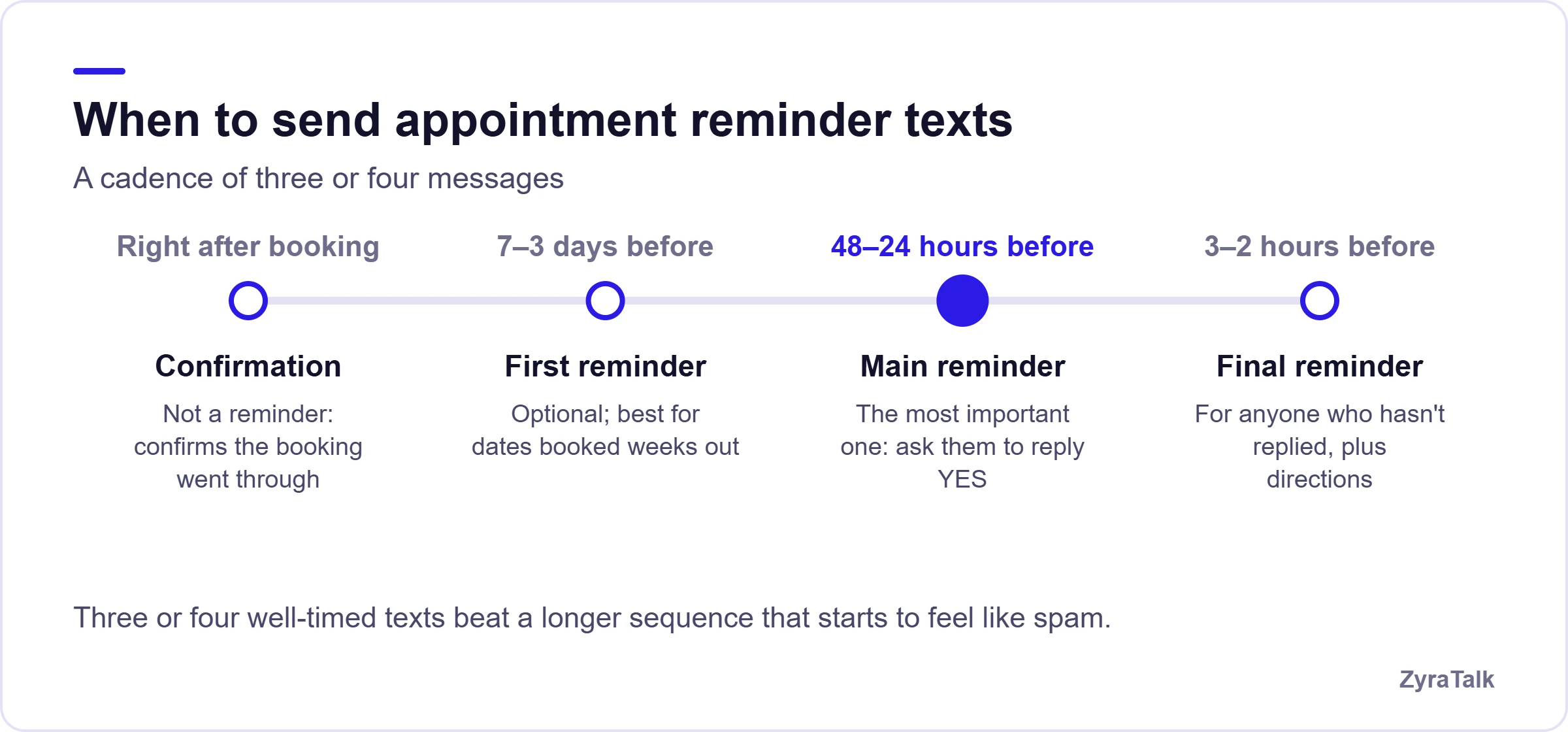
Send the messages at the right time and spread them out over the period leading up to the appointment. Be careful not to bombard clients, though. Three or four well-timed texts should do the trick.
1. Immediately after booking. Technically not a reminder, but confirmation of a successful booking.
2. Seven to three days before. The first reminder, encouraging the client to confirm or reschedule. These earlier reminders are optional, and most useful for dates booked several weeks in advance.
3. Forty-eight to 24 hours before. The most important reminder. At this point most clients know their schedule concretely and will make up their minds about confirming or rescheduling.
4. Three to two hours before. A final reminder for those who haven't responded yet. It can also offer last-minute directions to clients already on their way.
Tone and personalization
Use a warm, friendly tone and simple language. Do not demand that the client show up. Instead, the client should feel like you're trying to help them.
Instead of: "Remember your facial appointment tomorrow at 2 PM. Confirm now!"
Try: "Just a gentle reminder that you have a facial appointment with us at 2 PM. Please reply YES to save your seat."
In addition to the friendlier tone, personalize the message. You don't want it sounding robotic or generic. Address the recipient by name and cite the exact details of their appointment.
Appointment reminder text templates
Here are four copy-ready templates you can use right now for various situations.
Hi [Client's Name]! This is [Business Name]. Your appointment for [Service] has been confirmed on [Date] at [Time] at [Place]. Please call [Phone] to make changes. Thank you for choosing [Business Name].
24-hour reminder
Hi [Client's Name]! This is [Sender's Name] with [Business Name], reminding you that your [Service] appointment is tomorrow at [Time]. Please reply YES to confirm, or call us at [Phone] to make any changes. We look forward to your visit.
Day-of reminder
Hi [Client's Name]! Just a reminder that you have a [Time] appointment today with [Business Name] for [Service]. Please arrive 10 minutes early to [Directions]. Safe travels, see you soon!
Reschedule or cancel
Hi [Client's Name]! This is [Sender's Name] from [Business Name]. We're looking forward to seeing you on [Day] at [Time] for [Service]. If that no longer works for you, please let us know so we can help you find a better time. Kindly call [Phone] to reschedule or cancel.
Appointment reminder templates by industry
Hi [Client's Name]! Just to remind you that your [Service] booking with [Business Name] is scheduled for [Day] between [Time Window]. We'll text you when our technicians are on their way. Please reply 1 to confirm or 0 to reschedule.
Salons and wellness
Hi [Client's Name]! This is [Sender's Name] from [Business Name]. We can't wait to see you on [Day] at [Time] for your scheduled [Service]. Please reply YES to save your seat or call us on [Phone] if you need to reschedule. See you [Day]!
Medical and dental
Hello [Patient's Name]. This is [Clinic's Name] reminding you that you have an appointment with [Doctor's Name] on [Day] at [Time] for [Procedure]. Please arrive 15 to 20 minutes early with your photo ID and insurance card. Reply 1 to confirm, or call our office at [Phone] to reschedule. We hope to see you soon!
SMS vs. email appointment reminders
When to use each
SMS and email are both good ways to send appointment reminders, but one may be better than the other depending on the kind of reminder you want to send.
Text is best for:
- Same-day and 24-hour reminders
- Quick appointment confirmations
- Last-minute cancellations and scheduling changes
- Offline appointment confirmations
- Rescheduling notifications
- "On our way" alerts
Email is best for:
- Online appointment confirmations
- Pre-appointment checklists and instructions
- Detailed reminders with attached files, forms, or links to essential resources
- Appointment summaries with receipts or invoices
- Confirmations and post-appointment follow-ups
Combining both
There's nothing wrong with sending both email and SMS reminders. In fact it's recommended, because they complement each other's strengths and weaknesses and maximize attendance.
Text reminders are best for quick information that needs a response, while an email might sit unread in the recipient's inbox or spam folder for days. Emails, on the other hand, are ideal for more detailed reminders that may not translate well to a phone screen. You can pack an email full of instructions, reference materials, and engagement elements like forms and buttons.
Put those two together and you have an airtight reminder system, reaching clients via two independent channels and doubling the chances of the reminder catching their attention.
How to automate appointment reminders
Automated appointment reminders save time and ensure reminders are sent at the right time. All you need to do is set up reminder automation software and sync it with your calendar.
Manual vs. automated
Manual reminders involve organizing and writing the messages one at a time and sending them to individual clients. This process is repetitive, labor-intensive, and mundane. Not only does it require a great deal of an employee's time, it also makes the process prone to human error and, frankly, procrastination.
Automated reminders handle everything for you, from scheduling outgoing messages to logging responses.
| Manual reminders | Automated reminders | |
|---|---|---|
| Effort level | High. Your staff must write and send every single message. | Low. The software sends reminders without relying on human input. |
| Risk of human error | High. You can forget to send reminders or fail to send them on time. | Very low. Once the system is properly configured, it will never miss a reminder. |
| Personalization | Possible, but depends on the sender's creativity. | Easily and accurately personalizes messages. |
| Handling responses | Your staff tracks and records customer responses, another touchpoint for human error. | The system automatically records and presents responses. |
| Scalability | Limited by your staff's capacity. | Effectively unlimited. Handles any number of reminders at any time. |
Automation is the clear winner here, and a necessity for appointment-heavy businesses. Having someone manually write and send dozens of reminders every day simply won't cut it.
What to look for in software
The biggest task in using automated reminders is choosing the right software. You want something that does more than send texts or emails, with the features your business actually needs:
- Easy installation and setup
- Multi-channel delivery across text, email, and possibly voice
- Full calendar integration
- Customizable appointment reminder text templates
- Two-way messaging support
- Easy appointment confirmation, rescheduling, and cancellation
- Informative reporting
- Compliance with consumer data safety and privacy standards for your industry
Compliance and best practices
Sending appointment reminders involves handling sensitive customer information and sending some of it by digital means. You have to be careful not to violate your customers' right to privacy when setting up automated messages.
Opt-in, TCPA, and STOP handling
There's a fine line between sending a friendly appointment reminder and being a nuisance. Follow these practices to avoid crossing it:
- Obtain the customer's consent to send reminders.
- Make it easy for customers to opt out, with "reply STOP to opt out" or an unsubscribe link.
- Verify customer contact details to avoid sending reminders to the wrong people.
- Comply with the Telephone Consumer Protection Act (TCPA).
- Send reminders at appropriate times, not in the dead of night.
- Do not overwhelm your customers by sending too many.
- Send only the information necessary for the appointment.
- Use secure appointment reminder automation software.
This section is general guidance rather than legal advice. TCPA requirements and consent rules vary by use case, and health-related messaging carries additional obligations. Have counsel review your templates, consent capture and opt-out handling before you launch.
Reducing no-shows further
Besides sending reminders, here are other measures you can take to minimize no-shows:
- Make booking and rescheduling easy for the customer.
- Draft a solid cancellation policy and explain it to every customer.
- Ask for upfront deposits on high-value bookings.
- Design your calendar with breathing room to avoid long waits between appointments.
- Keep a waitlist to fill last-minute cancellations and reschedules.
- Shrink the advance booking window.
- Follow up on cancellations and no-shows.
- Gather and review data on no-shows to see where things are going wrong.
Getting started
Higher attendance means a fuller calendar, smoother cash flow, and easier scheduling. Appointment reminders, especially by text, help reduce no-shows and costly gaps in your calendar.
The beauty of it is how easy it is to begin. You need a handful of automated reminder templates, a client contact list, and a software platform that specializes in appointment scheduling and customer follow-up.
ZyraTalk is an AI-powered communications platform built for appointment-heavy service businesses, with AI booking, smart scheduling, and automated text reminders.
Book it, confirm it, keep it
ZyraTalk answers the call, books the appointment into your scheduling software, and handles the reminders after, for HVAC, plumbing, electrical, cleaning and painting businesses.
Book a demo- AI booking on every call
- Automated text reminders
- After-hours reschedules handled
Appointment reminder text FAQs
What should an appointment reminder text say?
Include the client's name, your business name, the appointment details, and a clear call to action such as replying YES to confirm. Add any preparation instructions and a phone number for changes.
When should you send appointment reminders?
Send a confirmation immediately after booking, a first reminder seven to three days out, the main reminder 48 to 24 hours before, and a final one two to three hours ahead. Three or four messages is usually enough.
Are appointment reminder texts legal?
Yes, provided you follow the Telephone Consumer Protection Act: obtain consent, identify your business, honor opt-out requests, and avoid sending at unreasonable hours. Health-related messaging carries additional obligations, so check with counsel for your industry.
Do appointment reminders actually reduce no-shows?
Published research puts the reduction from automated reminders at around 29%. The effect is strongest when the reminder asks for a confirmation reply and makes rescheduling easy, rather than simply restating the time.
How many reminder texts are too many?
More than four in the run-up to a single appointment starts to feel like spam and increases opt-outs. Three well-timed messages generally outperform a longer sequence.
Should I send reminders by text or email?
Text for anything time-sensitive or needing a reply, since open rates are far higher. Email for detailed instructions, forms, attachments and receipts. Using both gives you two independent channels to reach the client.