
An AI voice agent answers your phone, holds a natural conversation, and completes tasks like booking appointments. For a small business the buying decision comes down to four things: whether it can write into the software you already use, how it escalates what it cannot handle, what it actually costs at your call volume, and how it sounds on a real call. This guide covers how to test all four before you sign anything.
What is an AI voice agent?
An AI voice agent is software that conducts spoken phone conversations, listening, understanding what the caller wants, and taking action. For inbound business calls that means answering, qualifying, booking, and escalating.
You will see several names for overlapping things, and the distinctions matter when comparing vendors:
| Term | What it usually means |
|---|---|
| AI voice agent | The broadest term. Any AI conducting voice conversations, inbound or outbound. |
| AI receptionist | An inbound voice agent configured for front-desk work: answering, booking, routing. |
| AI answering service | Same function, positioned against traditional live answering services. |
| Conversational IVR | A phone menu upgraded with speech recognition. Routes, but usually cannot complete tasks. |
| Voice AI platform | Developer infrastructure for building your own agent. Not a finished product. |
That last row matters most for a small business. Several of the best-known names in this space sell platforms for developers to build on, not something you configure in an afternoon. Confirm which you are being sold.
- The category splits between developer platforms and finished products. Small businesses want the latter.
- Pricing is usually per-minute or per-plan. Model both against your real call volume before comparing headline rates.
- Integration depth is the most common disappointment, since "integrates with your CRM" spans everything from writing bookings to emailing a summary.
- Escalation configuration matters more than conversational quality. Test it explicitly.
- Always run real test calls, including a difficult one, before committing.
What it costs
Three models dominate, and they behave very differently at volume.
Per-minute
You pay for conversation minutes. Attractive at low volume, and it scales linearly, which means it becomes the most expensive option precisely when your business grows. Ask what counts as a billable minute: some vendors bill from ring, some from answer, some round up to the minute on every call. On a business taking many short calls, per-call rounding can double the effective rate.
Monthly plan with included minutes
A flat fee covering a minute allowance, with overage beyond it. Easier to budget, and usually better value above modest volume. The number to check is the overage rate, because seasonal businesses will exceed the allowance in peak months. An HVAC company can triple call volume in a heat wave.
Per-call or per-booking
Less common, occasionally offered. Aligns cost with outcome, but read the definitions carefully, because what counts as a qualifying call or a booking is where the margin sits.
Setup and configuration fees. Often one-time, sometimes substantial. Ask upfront.
Integration fees. Connecting to your field service software may cost extra or require a higher tier.
Number porting or additional lines.
Overage rates. The number that matters in your busiest month, not your average one.
Minimum contract length. Annual lock-ins are common, and a monthly option is worth paying slightly more for on a first deployment.
Model your own peak month, not your average month. A quote built on average volume will understate what you pay in the months when the service is most valuable.
Nine questions to ask any vendor
1. Does it write directly into the software I already use? Not "integrates with", but writes a booking into your field service platform, with the right job type, on the right calendar. Ask them to demonstrate it live in your system, not in a sandbox.
2. What happens when it cannot handle the call? Transfer to a person, text an on-call tech, take a detailed message? How is that configured, and who can change it later without vendor help?
3. How does it recognize an emergency? For the trades this is critical. A no-heat call in January and a request for a quote should not be handled identically. Ask how urgency is defined and what happens next.
4. Can it handle several calls at once? A key advantage over a human, but confirm there is no concurrency cap on your plan.
5. How is it configured for my business? Services, pricing ranges, service area, hours, holidays. Who does that work, how long does it take, and can you change it yourself afterwards?
6. What does it do with the call afterwards? Transcript, recording, structured data, and where it lands. This is also how you get reliable answer-rate and booking-rate data.
7. How does it handle bad audio and accents? Job sites are noisy and callers vary. Ask specifically about address and phone number confirmation steps.
8. What are the disclosure options? Whether and how it identifies itself as AI, given evolving state-level requirements.
9. What happens if it goes down? Failover to voicemail, to a forwarding number, to a human service? Ask about uptime history, and ask what happens to calls during an outage.
How to test one properly
A vendor demo shows you the product working under favorable conditions. What you want is how it behaves under yours. Make these five calls during a trial, ideally from a mobile phone rather than a quiet office.
Call 1, the easy one. "Hi, I need someone to come look at my water heater." Baseline: does it book cleanly?
Call 2, the emergency. "There's water coming out from under my sink, it's going everywhere." Does it recognize urgency and escalate, or does it try to book you for Thursday?
Call 3, the awkward address. Give a genuinely difficult street name, and give it fast. Does it confirm back correctly? Does it ask you to repeat rather than guessing?
Call 4, off script. Ask something it has not been configured for. "Do you guys do pool heaters?" Does it handle not knowing gracefully, or does it improvise an answer? Improvising is a serious problem, because an AI that invents a yes will cost you a wasted truck roll.
Call 5, the difficult caller. Be frustrated, interrupt it, talk over it. Does it stay coherent and route you to a human?
Make at least two of these from a car or somewhere with background noise. That is where your customers actually call from.
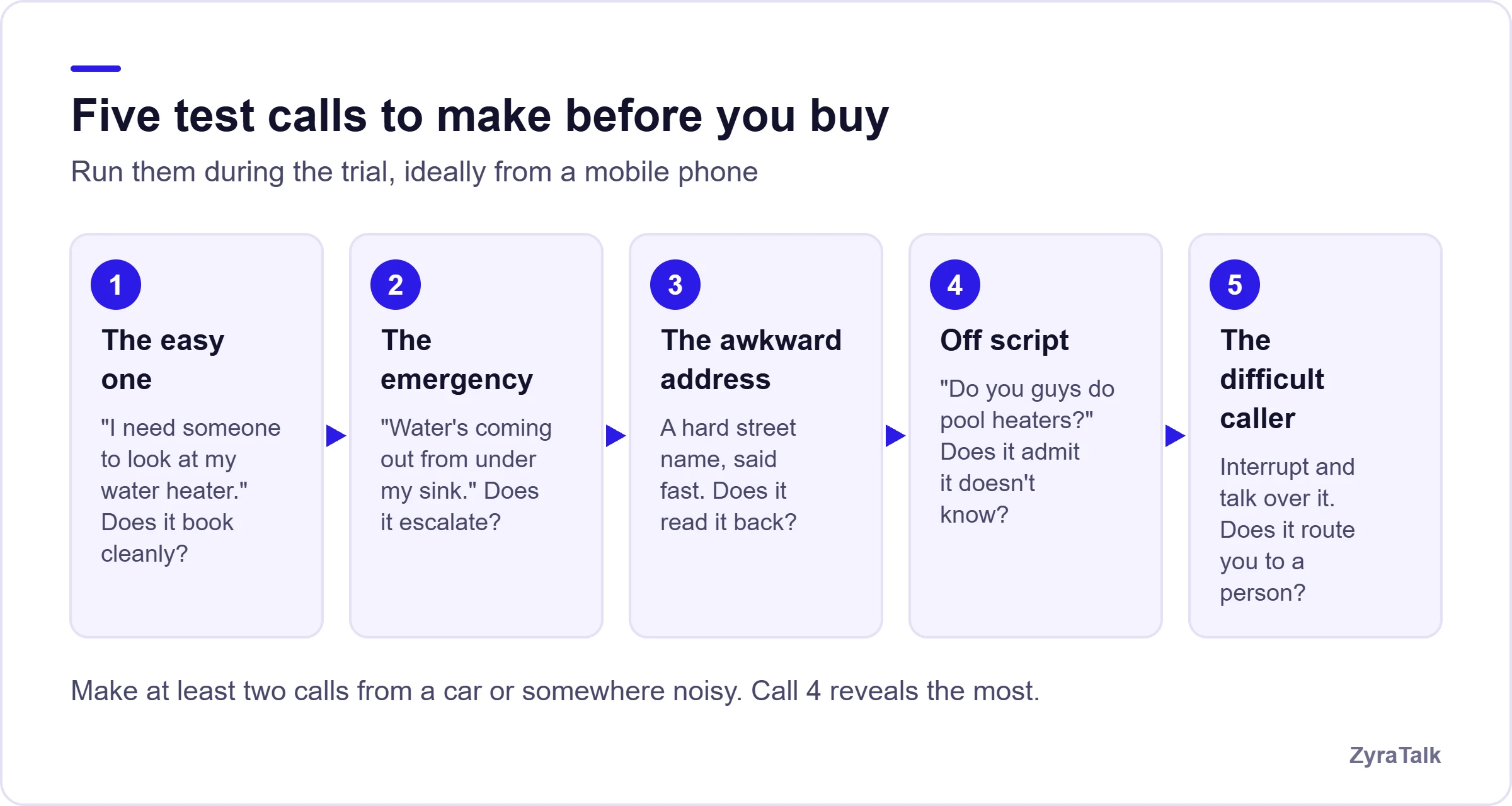
Call 4 is the one most buyers skip and the one that most often reveals the difference between products. An agent that confidently answers a question it was never configured for is worse than one that says it will have someone confirm.
Integration depth is where deployments disappoint
"Integrates with ServiceTitan" can mean any of the following:
- Writes a fully-formed booking with job type, customer record, and notes onto the correct technician's calendar.
- Creates a lead or task for someone to convert manually.
- Sends an email or Slack summary that a human re-enters.
- Exports a CSV.
Only the first eliminates double entry, and it is the only one that actually saves your office manager time. Ask which one you are buying, and ask to see it write into a live system during the evaluation.
Where an AI voice agent fits, and where it does not
Good fit
- Inbound calls are how work arrives.
- Staff are frequently unable to answer, whether in the field or on another line.
- Meaningful call volume outside business hours.
- Seasonal or unpredictable spikes.
- A large share of calls are routine: booking, hours, service area, status.
Poor fit
- Very low call volume that you already answer reliably.
- Highly consultative work where every call is unique and complex.
- A customer base that specifically expects a named person.
- No willingness to configure it properly, since these products reward setup effort and punish neglect.
How ZyraTalk compares
ZyraTalk is a finished product rather than a developer platform, built specifically for home service businesses. It answers every call including simultaneous ones, triages urgency so emergencies route to your on-call tech, and writes bookings directly into field service platforms including ServiceTitan, Housecall Pro, and Service Fusion. Every call is transcribed with structured data in one inbox. If you are working through the nine questions above, it is designed to answer all of them affirmatively, and the demo script is a fair way to test that claim.
The technology in this category is good enough now that most products will handle a straightforward booking call competently. The differences show up on the fifth call, not the first, so make the difficult calls before you sign, not after.
Make the hard call first
Book a working session and run all five test calls, including the emergency, the awkward address and the off-script question. We would rather you asked these of every vendor, us included.
Book a demo- Live booking into your own system
- Emergency triage on a test call
- Peak-month pricing, not average
AI voice agent FAQs
What is an AI voice agent?
Software that holds spoken phone conversations, understanding what a caller says and taking action such as booking an appointment, answering a question, or routing to a person. For inbound business calls it is often marketed as an AI receptionist or AI answering service.
How much does an AI voice agent cost for a small business?
Pricing is typically per-minute or a monthly plan with included minutes, often plus a one-time setup fee. Model it against your peak month rather than your average, and check overage rates and what counts as a billable minute.
Can an AI voice agent book appointments?
Yes, provided it integrates properly with your scheduling system. Confirm it writes a complete booking into your platform rather than emailing a summary someone has to re-enter.
What's the difference between an AI voice agent and an IVR?
An IVR routes callers through keypad menus. An AI voice agent understands natural speech and can complete the task rather than passing it along.
How do I test an AI voice agent before buying?
Make five calls during a trial: a routine booking, an emergency, one with a difficult address, one asking something outside its configuration, and one where you are frustrated and interrupt. Make some from a noisy environment. The off-script call is the most revealing.
What happens if it can't handle a call?
It should escalate, by transferring to a person, texting an on-call tech, or capturing a detailed message. How well this works depends entirely on configuration, so test it explicitly during evaluation rather than taking it on faith.