NOTHING SLIPS THROUGH THE CRACKS
Home Services Automation for Every Follow-Up
ZyraTalk by EverPro automates estimate follow-ups, invoice reminders, service plan renewals, and more, so nothing slips and no one has to chase the follow-up.
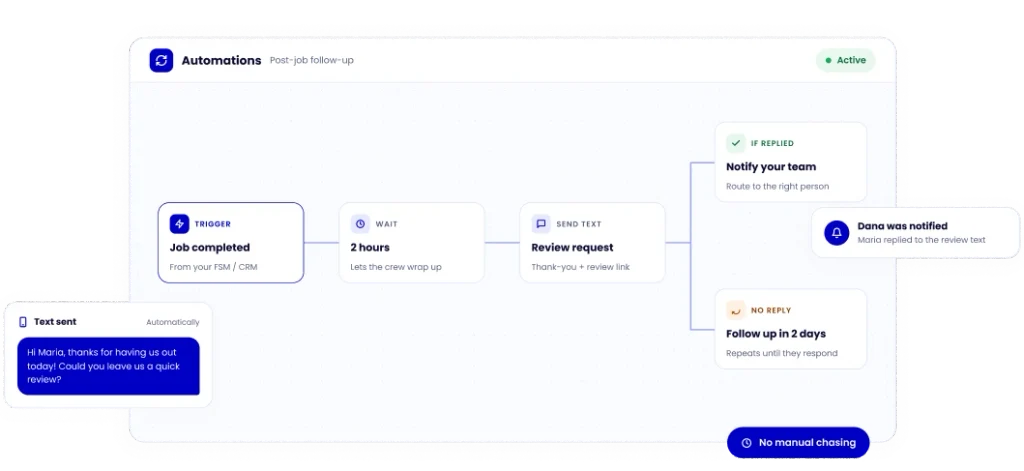
How Home Services Automation Works in ZyraTalk
Triggers on events
Actions fire automatically off events — a booking, a missed call, or a completed job.
Runs the full workflow
Reminders, follow-ups, and confirmations go out on time, every time, with no manual work.
Keeps you in the loop
Your team sees what happened and steps in only when something needs a human.
Six Follow-Ups ZyraTalk Can Run for You
These are the follow-ups that usually depend on someone remembering. ZyraTalk runs them on the schedule you set.
Revenue
Estimate follow-ups
Stalled estimates get an automatic follow-up so they keep moving.
Revenue
Invoice reminders
Overdue invoices get a reminder without anyone in the office chasing them.
Retention
Service plan and membership renewals
Customers hear from you before a plan lapses.
Reputation
Review requests
After the job is done, ZyraTalk sends the review request.
Scheduling
Appointment reminders and confirmations
Customers get a reminder and confirm before the visit.
New leads
Missed-call text-backs
A text goes out the moment a call goes unanswered.
Everything You Can Put on Autopilot
What an Automated Workflow Looks Like
Here’s a post-job review request, one of the workflows ZyraTalk can run for you.
- 1
Job completed
The job is marked complete in your system.
- 2
Wait
ZyraTalk waits for the delay you set.
- 3
Send review request
The customer gets a review request.
- 4
Notify or follow up again
Your team is notified, or ZyraTalk follows up again.
Never Let a Follow-Up Fall Through the Cracks
The revenue lost to forgotten follow-ups and no-shows adds up fast. ZyraTalk automates the reminders, text-backs, and follow-up sequences that keep jobs on the calendar and leads moving consistently, without anyone having to remember to hit send.
Automated Follow-Up vs. Doing It by Hand
Most home service businesses already know which follow-ups matter. The hard part is doing them every time.
| Manual follow-up | ZyraTalk Automation | |
|---|---|---|
| What starts the follow-up | Someone remembering to do it | An event in your business, like a booking, a missed call, or a completed job |
| Timing | Whenever someone has a free minute | On the schedule you set |
| Consistency | Depends on who’s working and how busy the day is | The same workflow runs every time |
| Your team’s role | Doing the chasing | Stepping in only when something needs a human |
Follow-Up by Phone and by Text
ZyraTalk follows up with customers and prospects by phone and text, so you can reach people on the channel they answer.
Outbound Calling
Calls for estimate follow-ups, appointment reminders, invoice follow-ups, and more.
Outbound Texting
Sends appointment reminders, review requests, and automated follow-up campaigns by SMS.
What Automation Delivers for Your Team
“Their technology is advanced and nearly indecipherable as a machine vs human. ZyraTalk is certainly leading the charge in AI.”
— Brendan S.
Works with: Outbound Calling · Outbound Texting · AI Answering Service · AI CSR · AI Webchat · Analytics
Built for Home and Field Service Businesses
Configured for how your trade actually works.
Home Services Automation FAQs
What can you automate in a home services business?
You can automate a lot of repetitive communication: appointment reminders and confirmations, missed-call text-backs, post-job follow-ups and review requests, and lead nurture sequences. ZyraTalk fires these automatically off events like bookings and missed calls, so they happen on time without manual work.
How does customer communication automation work?
It works off triggers — when something happens, like a booking, a missed call, or a completed job, ZyraTalk automatically runs the right workflow, such as sending a reminder or a follow-up. Your team stays in the loop and steps in only when a human is needed.
Does automated follow-up feel impersonal to customers?
It doesn’t have to. Messages are in your brand voice and timed to be genuinely helpful, like a reminder before an appointment or a quick follow-up after a job, so customers feel looked after, not spammed.
Can ZyraTalk follow up on estimates and invoices?
Yes. ZyraTalk automates estimate follow-ups, invoice reminders, and service plan renewals, so they don’t depend on someone in the office remembering.
Can I control when follow-ups go out?
Yes. Automation sends the invoice reminder, the estimate follow-up, the review request, and the service plan renewal on the schedule you set.
Does automation follow up by phone or by text?
Both. ZyraTalk follows up with customers and prospects by phone and text, using Outbound Calling and Outbound Texting.
Do I have to buy the whole ZyraTalk platform to use automation?
No. Each ZyraTalk product works on its own. Book a demo and we’ll walk you through what fits your business.
How much does home services automation cost?
ZyraTalk’s pricing is customized to your business. Book a demo for a quote.
Put Your Team’s Busywork on Autopilot
See how ZyraTalk’s automation can save your team time and grow your business without adding headcount.